# Introducing Firn

Firn is a zero-knowledge privacy platform for Ethereum and EVM-based chains.

## Overview

*Firn* is a state-of-the-art, zero-knowledge privacy utility for Ethereum and EVM-based rollups. Firn supports not just private *payments*, but the private invocation of arbitrary smart contracts. Firn moreover allows deposits and withdrawals of arbitrary *amounts* of Ether, as well as private, peer-to-peer payments (in which the sender's and receiver's identities *and* the amount being transferred are all hidden). In this light, Firn can be viewed as something like a general-purpose private *wallet* for EVM-based blockchains.

**Unlike all other projects in the privacy space, Firn uses an&#x20;*****account-based*****&#x20;architecture.** In practical terms, this means that Firn's browser-based wallet can retrieve and synchronize your account state extremely efficiently, downloading less than a kilobyte of data in the process. Other projects require data downloads in the megabytes, and prohibitive synchronization times. These requirements have proven problematic for various ecosystem partners (including [*Aztec*](https://forum.aztec.network/t/request-for-proposals-note-discovery-protocol/2584) and [*Zcash*](https://zecsec.com/posts/scalable-private-money-needs-scalable-private-messaging/)). As privacy projects continue to grow and mature, we believe that our wallet's superior efficiency will prove decisive.

{% hint style="info" %}
Firn has been [audited by BlockSec](https://github.com/blocksecteam/audit-reports/blob/main/solidity/blocksec_firnprotocol_v1.0-signed.pdf). This audit captures the protocol's high-level payment, funds storage, and token logic. The protocol's cryptography—while designed and implemented according to the most exacting possible standards—has not yet gone through a formal audit.
{% endhint %}

## Quick links

{% content-ref url="/pages/In4EbqNMjRSotBIesH2o" %}
[Using Firn](/overview/using-firn)
{% endcontent-ref %}

{% content-ref url="/pages/4MCISmGteAy611UlBUM2" %}
[Cryptographic Explainer](/overview/cryptographic-explainer)
{% endcontent-ref %}


# Using Firn

Firn is easy-to-use and responsive.

In this page, we'll cover the basics of using Firn.

## Feature Overview

Firn can be viewed as a general-purpose *private wallet* for Ethereum-based chains. Using Firn involves, roughly, three steps.&#x20;

### Creating an Account

Creating an account with Firn is extremely easy. Firn will *never* ask you to download or remember ad-hoc passcodes or aliases. Rather, your Firn account will always be controlled exclusively by some *standard*, regular Ethereum account, maintained by your active wallet. In other words, you don't have to store any secrets *beyond* your wallet's regular seed phrase (which you've already stored).

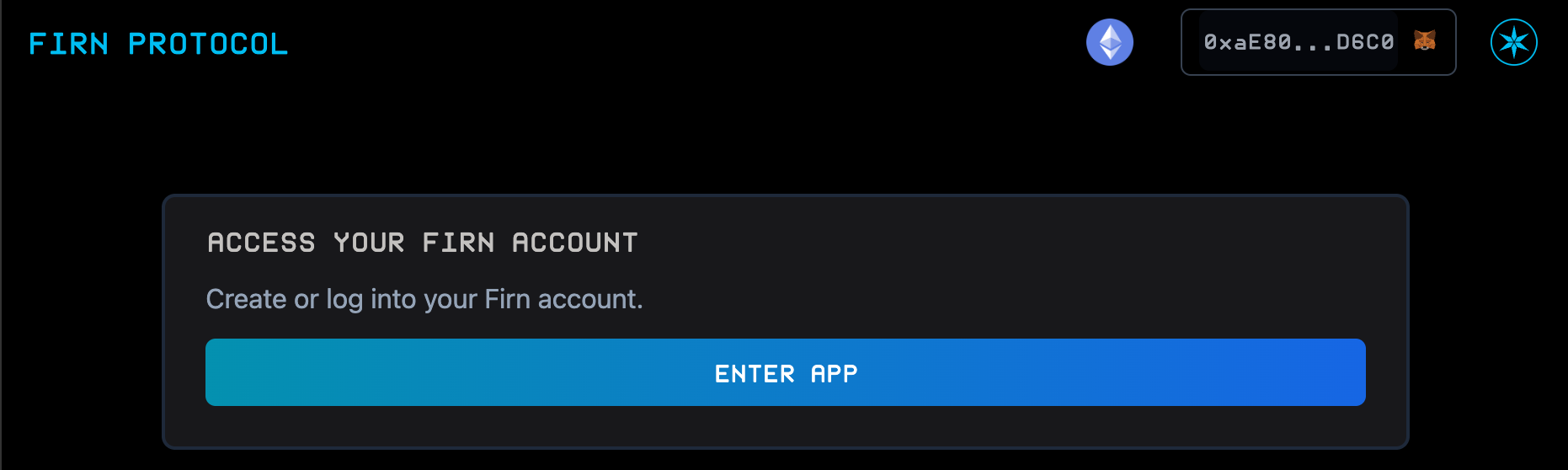
To start, on the [main app page](https://firn.cash), log in using a wallet and select a network. Once you're logged in, your currently-active Ethereum account will appear at the top-right corner of the screen.

<figure><img src="https://3447577477-files.gitbook.io/~/files/v0/b/gitbook-x-prod.appspot.com/o/spaces%2F9gybBE9eYBHgZMTJRCk3%2Fuploads%2FFjo4H3fsPRooFKr2gW4s%2FScreenshot%202023-04-15%20at%204.29.42%20PM.png?alt=media&amp;token=5acffaf5-9fba-4a40-8afc-48ba8d343ac6" alt=""><figcaption><p>Make sure to use an Ethereum account you won't lose.</p></figcaption></figure>

Before proceeding, make sure that you're using a secure Ethereum account, which you fully control. We recommend the use of Ledger-controlled accounts for this purpose. If you lose access to this Ethereum account, you will lose your funds.

Once you're ready, click "Enter App"; after signing a login message twice, you'll gain access to the main Firn interface. In the future, you'll only have to sign once.

### Depositing Funds

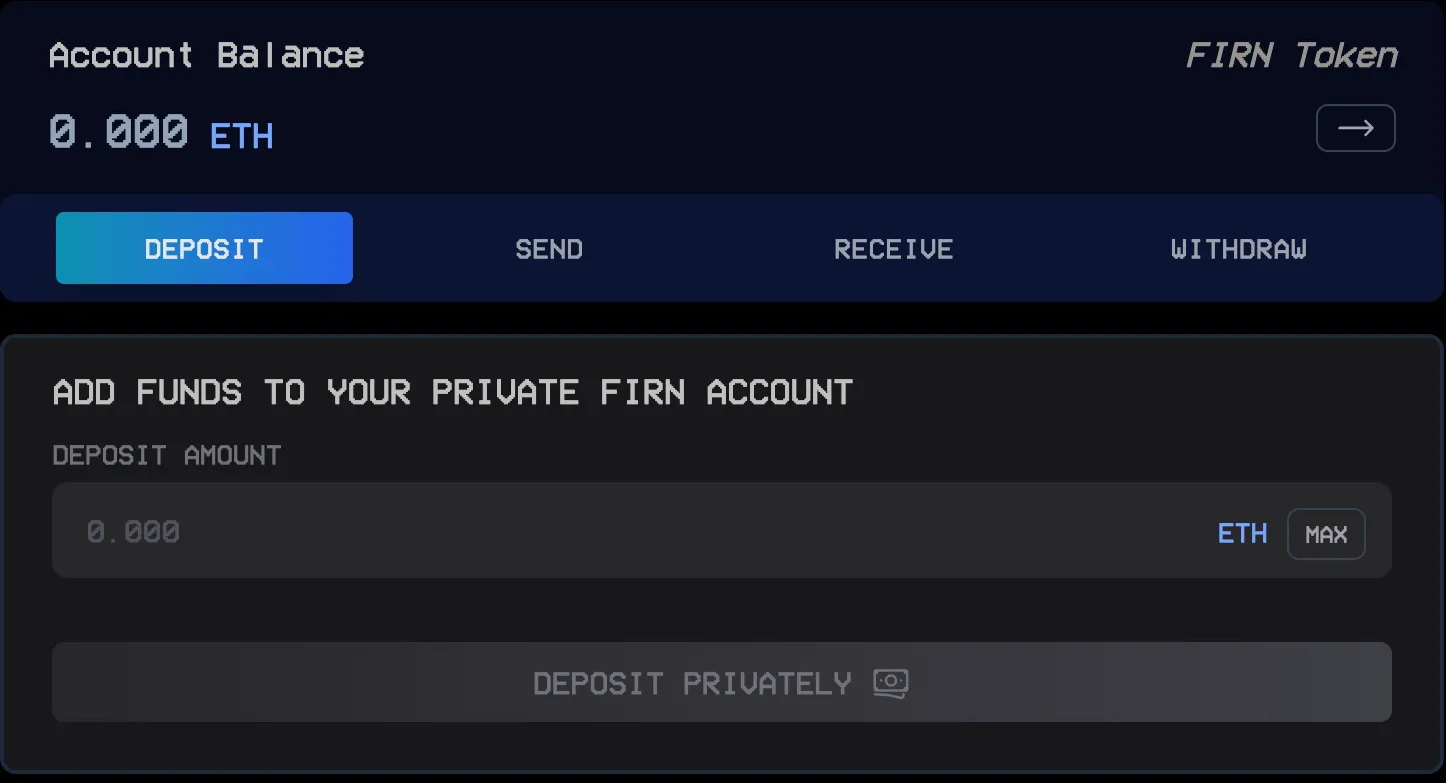
Depositing funds into Firn is straightforward. Just enter an amount in the main box, and click "Deposit Privately". Your wallet will prompt you to confirm the deposit.

<figure><img src="https://3447577477-files.gitbook.io/~/files/v0/b/gitbook-x-prod.appspot.com/o/spaces%2F9gybBE9eYBHgZMTJRCk3%2Fuploads%2FRCU4f9d6aKB1uCXi62VX%2Fdeposit.png?alt=media&amp;token=cf686bfb-b94d-4a77-8d1f-b03f174ce44c" alt=""><figcaption><p>Firn's <em>deposit</em> panel.</p></figcaption></figure>

Once you’ve logged in, you can freely switch accounts (and even wallets), while continuing to make deposits from these different accounts. The deposits will still work (and will all consolidate into your Firn account).

### Withdrawing Funds

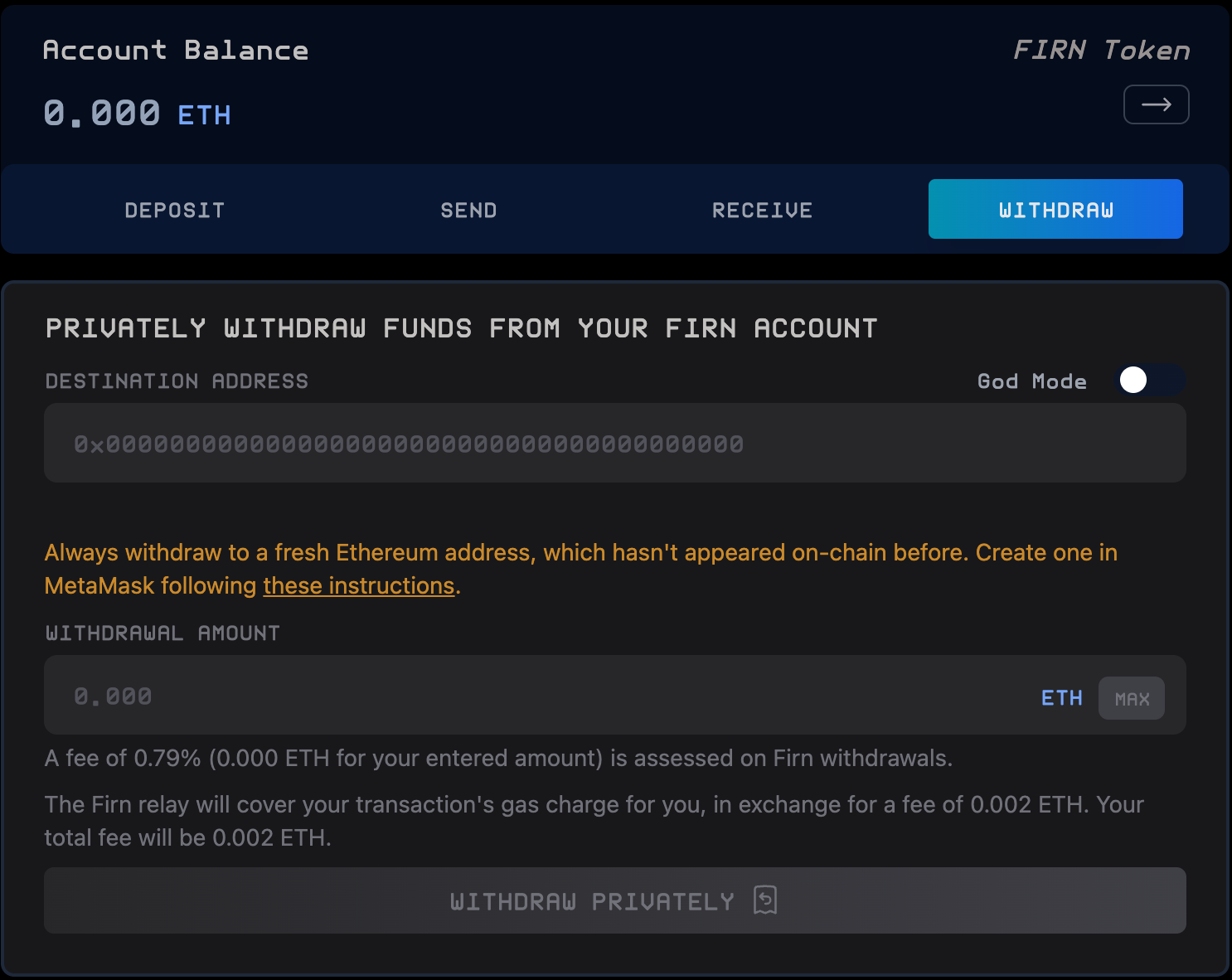
A Firn *withdrawal* entails removing funds from your private Firn wallet, and directing them to an external Ethereum address. Again, here, the process is straightforward: enter a destination address and an amount, and click "Withdraw Privately". The key, here, is that you should always send your funds to a *fresh* Ethereum account, which hasn't appeared on-chain before. Creating a new such account is straightforward in most wallets. This requirement comes from privacy; if you use an Ethereum account with history, that history can reveal information about you (defeating the purpose of using Firn).

<figure><img src="https://3447577477-files.gitbook.io/~/files/v0/b/gitbook-x-prod.appspot.com/o/spaces%2F9gybBE9eYBHgZMTJRCk3%2Fuploads%2F1IRX1WI3pWbOqBmFs13U%2FScreenshot%202023-04-17%20at%2011.34.08%20PM.png?alt=media&amp;token=8e86a531-b672-42d4-ae94-fe6484a3f6a4" alt=""><figcaption><p>Firn's withdrawal panel.</p></figcaption></figure>

For similar reasons, you should *not* withdraw an unusual or unique amount, *especially* if you've previously deposited the same amount. For example, do not deposit 420.69 ETH and later withdraw this same amount (i.e., minus fees).

### Sending and Receiving Funds

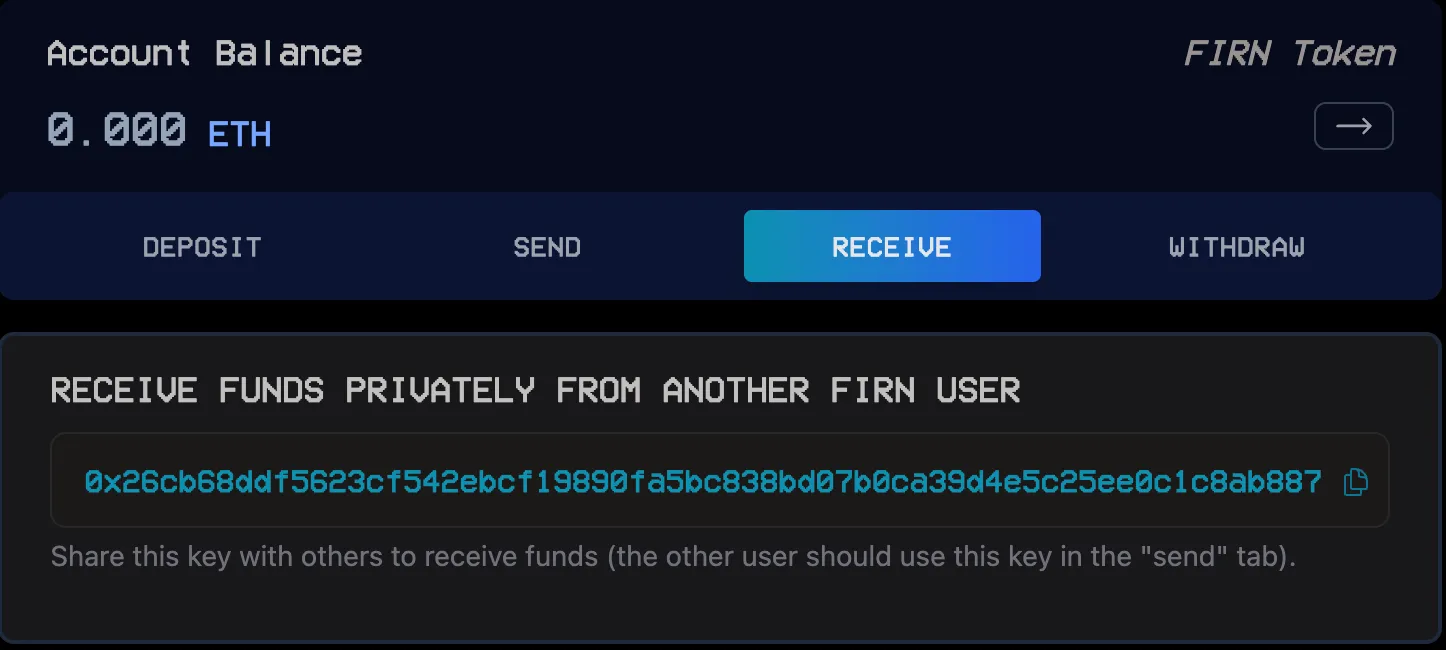
The best way to send funds to others is to privately send them within Firn. To receive funds from others, share your public key with them. You can even share this key publicly.

<figure><img src="https://3447577477-files.gitbook.io/~/files/v0/b/gitbook-x-prod.appspot.com/o/spaces%2F9gybBE9eYBHgZMTJRCk3%2Fuploads%2FEYJ42NwSxxCVRRKMLkXF%2Freceive.webp?alt=media&amp;token=e84910fd-78e3-4105-a4f3-2d6dcef458c8" alt=""><figcaption><p>Share your public key with others to receive Firn transfers.</p></figcaption></figure>

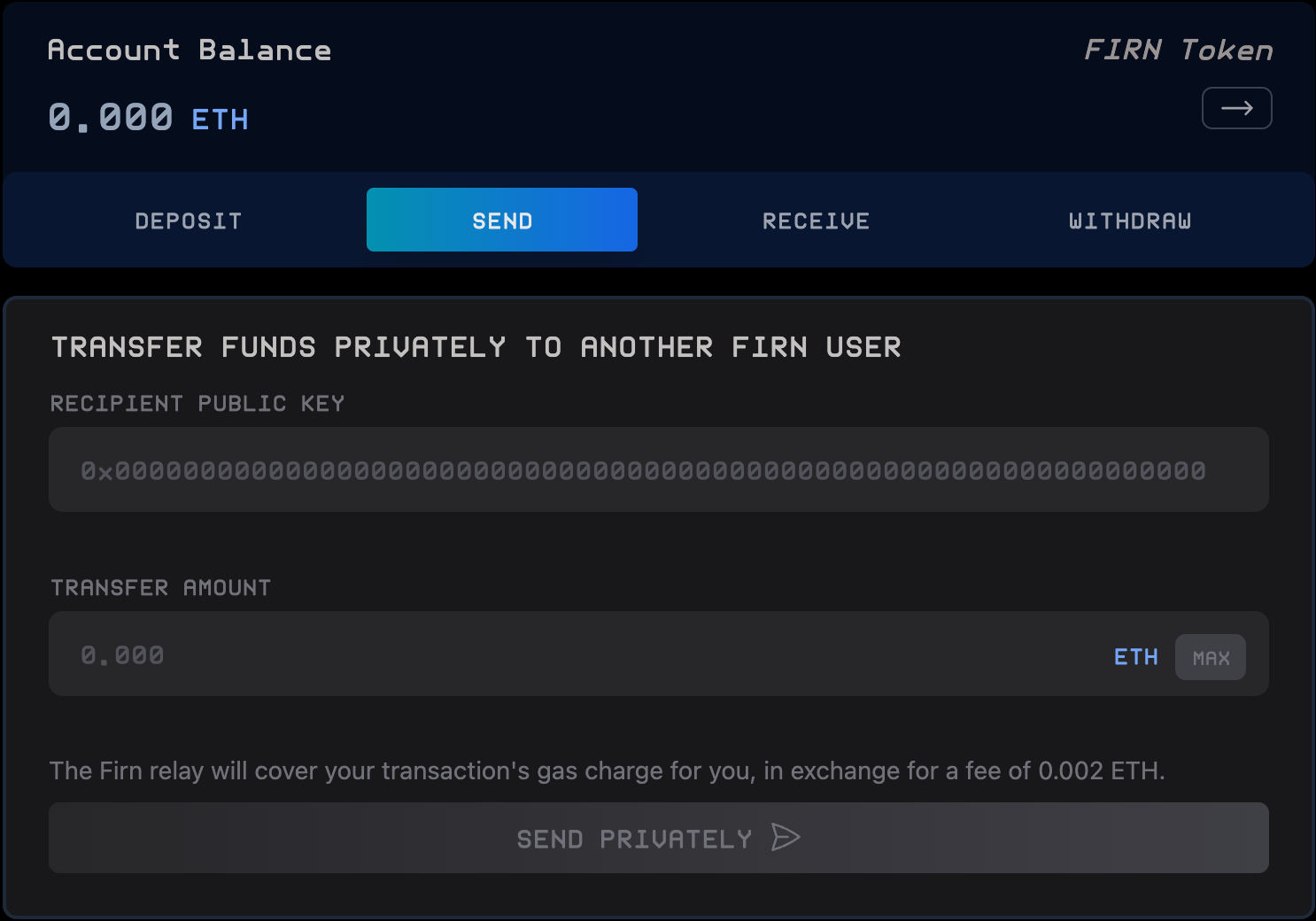
Symmetrically, to transfer funds, use the "Send" tab.

<figure><img src="https://3447577477-files.gitbook.io/~/files/v0/b/gitbook-x-prod.appspot.com/o/spaces%2F9gybBE9eYBHgZMTJRCk3%2Fuploads%2F6ogiCMCCd9MtME7GyW8o%2FScreenshot%202023-04-17%20at%2011.37.18%20PM.png?alt=media&amp;token=d58b2d3e-2f2f-4597-97c2-4a4678c2e4f3" alt=""><figcaption><p>Transfer funds privately to other Firn users using the <em>Send</em> tab.</p></figcaption></figure>

For peer-to-peer payments, Firn transfers *always* provide better privacy than withdrawals, since they hide the identities of the sender *and* receiver, as well as the amount transferred.

## Further Remarks

The canonical way to use Firn is to deposit *all* of your active funds into Firn, and to withdraw funds on an as-needed basis. Firn should *not* be used as a "pass-through layer"; because of timing and amount inference, using Firn in this way will *not* provide strong privacy.

Interestingly, you may—and should—use your Firn account to consolidate funds from disparate Ethereum accounts. Firn’s *deposits* are privacy-preserving, in that consolidation behavior of this sort won’t reveal whether the relevant Ethereum accounts are controlled by the same entity or not. For more details on this technique, check out our [Power-User's Guide](/overview/using-firn/power-users-guide).


# God Mode

Privately invoke arbitrary smart contracts.

*God Mode* is an advanced user mode in Firn, which lets you withdraw *to contracts*. Specifically, Firn supports a variant sort of withdrawal whereby, instead of withdrawing your funds directly to an EOA, Firn sends them to a payable function on some contract, and *simultaneously* supplies user-specified calldata to that function.

The effect of this is that you can call any function on any contract "as" Firn; the identity of the caller is hidden. For example, you could buy some token, say, anonymously, and direct the token to some fresh account with no history. This feature is very powerful. While you *could* emulate a similar functionality by, say, withdrawing first to a burner EOA, and then using that EOA to transact, with God Mode, you can do the same thing gasslessly (you don't have to worry about leaving leftover gas in the burner account), and in just one step. This even works for *non*-payable functions; in the same way, you can even call these gasslessly and anonymously.

In this post, we will walk you through how to do this, via an example. In this example, we will buy 1 ETH worth of [FIRN Token](/overview/firn-token), anonymously.

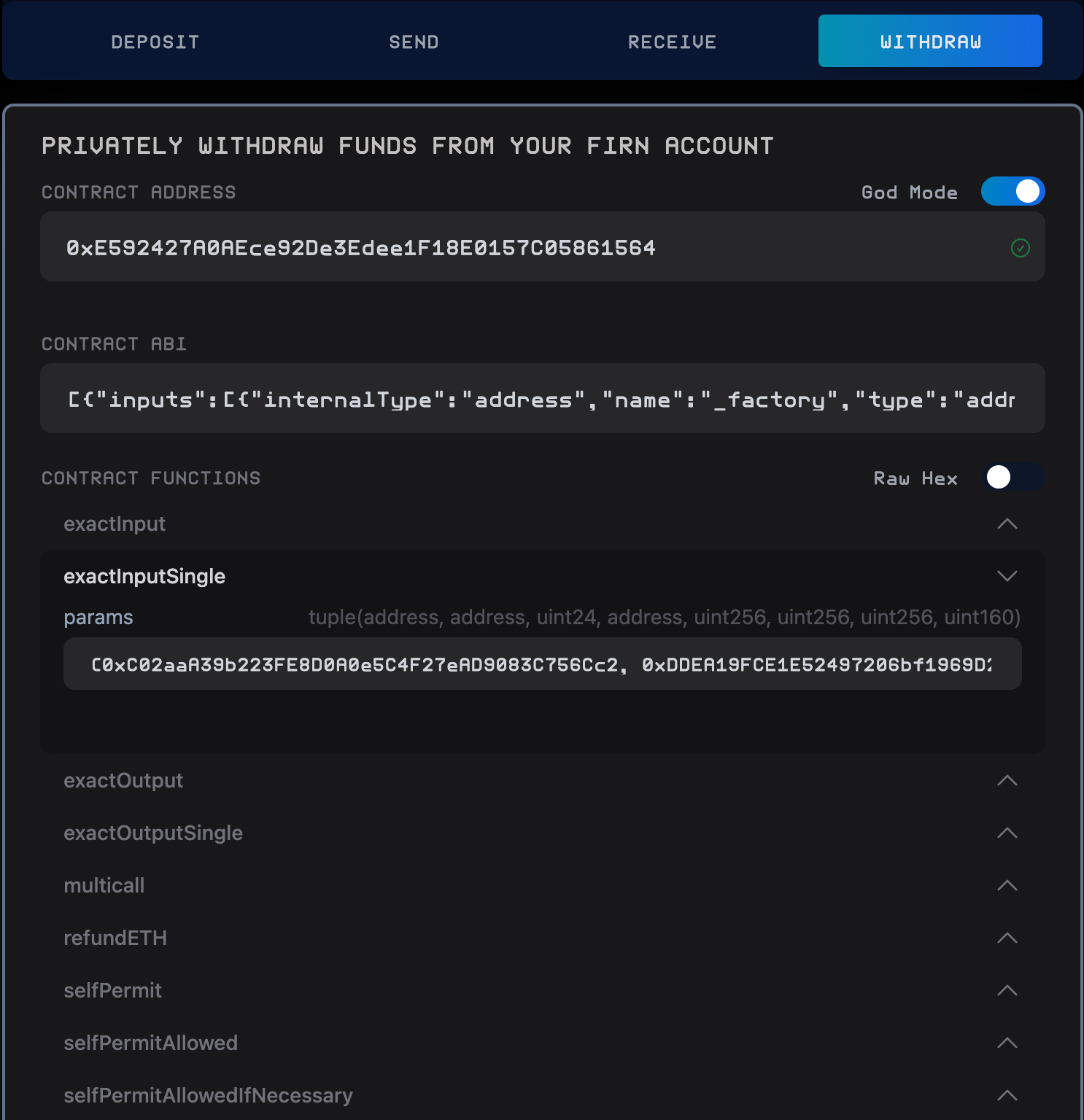
First, log into Firn, and navigate to the "Withdrawal" tab; then, click the "God Mode" toggle. Enter the address of the *contract* containing the function you want to call. For example, we will enter the address `0xE592427A0AEce92De3Edee1F18E0157C05861564` of the `UniswapV3Router`. At this point, since the contract is verified on Etherscan, the contract ABI will auto-populate; for unverified contracts, you will have to enter the ABI manually.

At this point, you can either manually select a function and enter its arguments, or else enter raw hexadecimal calldata (see the "Raw Hex" toggle). In our case, we will manually enter the arguments required for our purchase; we direct the resulting token to a *fresh* address.

<figure><img src="https://3447577477-files.gitbook.io/~/files/v0/b/gitbook-x-prod.appspot.com/o/spaces%2F9gybBE9eYBHgZMTJRCk3%2Fuploads%2FDH2IPPS4slQgd19TGG49%2FScreenshot%202023-04-17%20at%2011.46.09%20PM.png?alt=media&amp;token=0a1392c4-fd42-4deb-abba-bd517e667b72" alt=""><figcaption><p>A sample of what you'll see in the <em>God Mode</em> screen.</p></figcaption></figure>

In practice, it is fairly unusual that you will want to enter these yourself, unless you're very sure of what you're doing (or you're interacting with a simple contract). Indeed, usually, when we interact with the blockchain, front-end web applications populate our transactions for us.

Alternatively, you can also simply enter the raw hexadecimal calldata you want (including the 4-byte function signature and the ABI-encoded arguements). In practice, you might "lift" this from a transaction prompt populated by some other application.

To do this, toggle the "Raw Hex" switch. You'll see something like this:

<figure><img src="https://3447577477-files.gitbook.io/~/files/v0/b/gitbook-x-prod.appspot.com/o/spaces%2F9gybBE9eYBHgZMTJRCk3%2Fuploads%2FIgbIkxKaI4ercCz1sZTR%2FScreenshot%202023-04-17%20at%2011.43.25%20PM.png?alt=media&amp;token=2a971018-99c8-4467-bf44-63c040d065b3" alt=""><figcaption><p>Calling an arbitrary function with raw hexadecimal calldata.</p></figcaption></figure>

Click "Transact Privately", and your transaction will be dispatched.


# Power-User's Guide

Tips to get the most privacy out of Firn.

This post explains in slightly more detail how to use Firn, so as to obtain optimal privacy.

For most users, it’s sufficient just to follow the most basic rules, already discussed in [Using Firn](/overview/using-firn): namely, to avoid withdrawing or transferring immediately after depositing, and moreover to avoid withdrawing a quantity which obviously links you to a prior deposit. If you follow these rules, and use the UI naturally, you'll gain most of Firn's benefits. This article assumes knowledge of these basics, goes a bit beyond them.

Importantly, Firn follows the *account-based* paradigm; this fact is discussed in more detail in our [Cryptographic Explainer](/overview/cryptographic-explainer). Please skim that article before reading this one.

## Your Accounts: Firn & Ethereum

The below image shows a logged-in account state:

<figure><img src="https://3447577477-files.gitbook.io/~/files/v0/b/gitbook-x-prod.appspot.com/o/spaces%2F9gybBE9eYBHgZMTJRCk3%2Fuploads%2F0t8EhurOnIsrM5PH2x1p%2Faccounts.webp?alt=media&amp;token=ce2dacc5-a94d-4f2d-b200-1b4b34672622" alt=""><figcaption></figcaption></figure>

I’ll distinguish in this post between your *Ethereum account*—in this case, `0xFc6b...4fCE`, and your *Firn account*, which in this screenshot is `0x26cb...b887`. Your active Ethereum account will always appear in the rectangular bar at the top right, to the left of the wallet icon. Your Firn account is (when you’re logged in) represented by the circular avatar, and will appear if you click that avatar. In Firn, privacy comes from dissociating your Ethereum and Firn accounts (especially during withdrawals).

Firn actually has two kinds of deposits. This is because—for Sybil protection, and in order to prevent the anonymity set from being flooded by attacker-controlled accounts—Firn requires that each new account do two things:

* sign a message on behalf of itself.
* deposit a nominal amount (at least 0.010 ETH).

In order to make the user experience as smooth as possible, Firn automatically and quietly handles both of these tasks in your first deposit, which we’ll henceforth call a *registration*. Because of the first requirement, however, in registrations, the depositing Ethereum account and the destination Firn account *are* linked. In standard deposits, they’re *not*.

For most users, the mere fact that withdrawals are private will deliver sufficient privacy, regardless of the privacy of deposits. If you want maximal privacy, though, you should perform your *registration* from a *non-sensitive* Ethereum account—containing only a nominal amount of funds (namely, at least 0.010 ETH)—and then, after waiting appropriately, deposit the bulk of your funds. This latter deposit *will* be anonymous.

Let’s go through the flow. The key technique is switching Ethereum accounts after you’re already logged in.

#### Logging In

The first thing you should pay attention to is which Ethereum account is active when you log in in the first place. This account will be used—later—to regain access to your funds. Always log in using an account which you won’t forget or lose control of. We recommend using a Ledger for this purpose. The act of logging in is entirely local; nothing will show up on-chain.

#### Registration

Next step is your initial deposit, or your registration. To go through this process, you should—after logging in—select a non-sensitive Ethereum account, with a nominal amount of funds. In general, this can and will be *different* from the account you used to log in. If this is so, you will need to switch accounts in your wallet (you can even switch wallets altogether). When you switch accounts, you should see the active Ethereum account in the top right *change*; a toast will also appear upon each account change. After switching if appropriate, enter some amount (say, the minimum of 0.010 ETH) in the deposit panel, and go through with the deposit (really, a registration).

#### Subsequent Deposits

Once you’ve registered, you're good to go. *Always wait some time after registering before making further deposits.* Going forward, you can log back into Firn (using the initial account from the login step), and then select an arbitrary Ethereum account (switching if necessary). You can then deposit from this arbitrary Ethereum account. Each such Ethereum account will *not* be linked to your Firn account, *or* to the account you used to register.

Note that once you’ve logged in, your *Firn* account will *not* change, even if you switch Ethereum accounts. To log into a *different* Firn account, you will need to log out, select an appropriate Ethereum account, and log back in.

## In Summary

To summarize, for maximal privacy, here is the flow:

* log in, using a secure account (ideally a Ledger). this act is local, and has no publicly visible manifestation.
* select a non-sensitive Ethereum account (switching if necessary), and make a nominal registration deposit.
* from this point, make (possibly multiple) deposits from arbitrary, sensitive Ethereum accounts. these won’t be linked, either to each other, to your Firn account, or to your registration account.

Withdrawals and transfers work in the usual way, and are *always* private. As always, make sure to wait between deposits and withdrawals, and to withdraw generic amounts.


# Cryptographic Explainer

Firn's unique account-based architecture makes it unprecedentedly efficient.

This post describes Firn's cryptographic architecture, including what data, exactly, is stored on-chain, and how Firn’s browser-based client interacts with that data. For a slightly more advanced survey, please see our [technical whitepaper](https://firn.io/whitepaper.pdf).

## Account-Based Privacy

The crucial thing to understand is that Firn is *account-based*; every other live-and-working cryptographic privacy protocol is *UTXO-based*. This distinction is analogous to that between Ethereum and Bitcoin. Indeed, you can think of Firn as something like "Ethereum, but private"; other protocols—like Zcash, Monero, and Aztec—are more like "Bitcoin, but private."

Firn’s state consists of a global table of *accounts*. (These are analogous to those constituting Ethereum’s global account table, but they exist *within* Firn’s contract.) Just as Ethereum associates, to each account, a balance—and also code, storage, etc. in the case of contracts, but let’s ignore that—Firn associates, to each account, an *encrypted* account balance, encrypted under its owner’s key. Each account’s balance can *only* be viewed by the account’s owner.

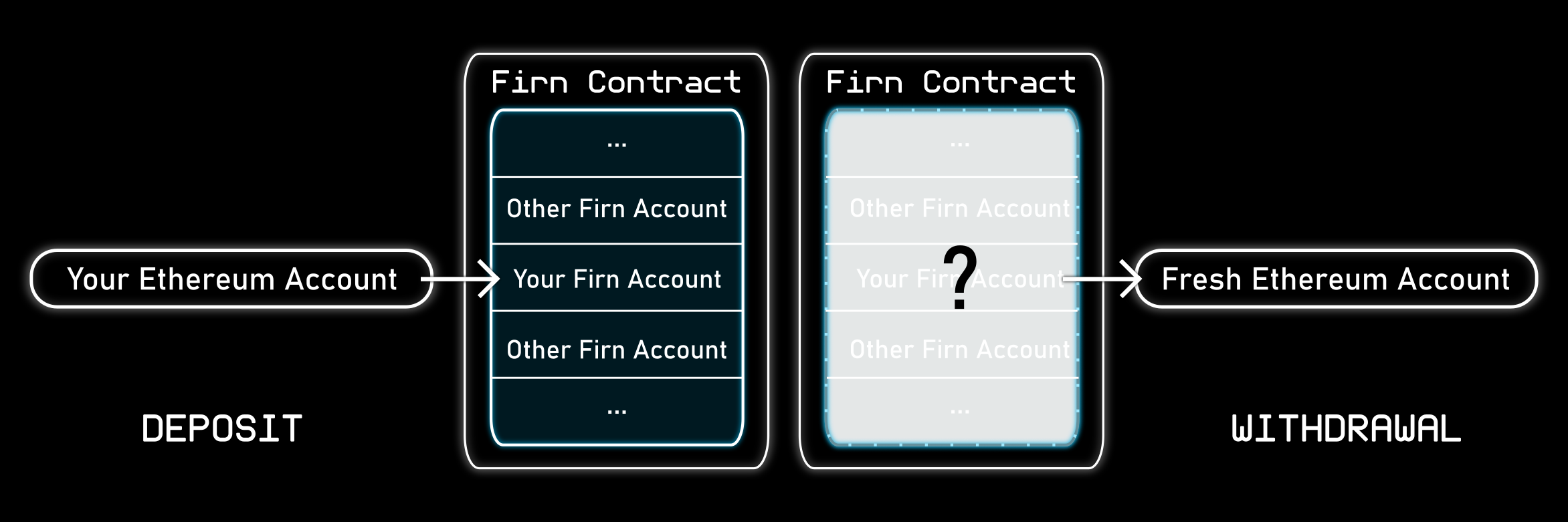
When you deposit into Firn, you credit your own balance’s account. When you withdraw, on the other hand, you debit your account. Crucially, Firn withdrawals take place in such a way that it’s not visible *which* account is being debited. In other words, your account will be hidden within a number of other accounts, when the withdrawal takes place; it will not be publicly discernible which among these accounts initiated the withdrawal. This is where Firn’s privacy comes from. A depiction of this process is given below.

<figure><img src="https://3447577477-files.gitbook.io/~/files/v0/b/gitbook-x-prod.appspot.com/o/spaces%2F9gybBE9eYBHgZMTJRCk3%2Fuploads%2F5qMSMAhx44J3o5yrwGwJ%2Fgraphic.png?alt=media&amp;token=82d31cca-7c31-48bf-a0fc-69e86ba9bb3a" alt=""><figcaption><p>A depiction of Firn's account-based architecture.</p></figcaption></figure>

This diagram is simplified; in reality, Firn deposits are *also* private. Firn supports *private transfers*. These work similarly to private withdrawals, except that, in a single transaction, the sender’s and receiver’s accounts are simultaneously debited and credit, respectively.

As it turns out, Firn’s account-based architecture has immense benefits, and makes it vastly more efficient than UTXO-based privacy protocols. Let’s explore this fact. The key property is that, when your account state changes—say, when you receive a transfer—your old account is *overwritten* by your new account! In UTXO-based settings, when you receive a payment, of course no overwriting takes places, and your “holdings” can be, in general, spread throughout hundreds of UTXOs.

This difference—fundamental to the definition of the *account-based model*—has immense ramifications. In short, in Firn, retrieving *your own account state* is an extremely simple, instantaneous task; you must only query a table entry, and decrypt the resulting ciphertext. In UTXO-based privacy protocols, it’s far harder. It requires that you download *every transaction* posted to the system since you last synchronized, trial-decrypt *each transaction* (to learn whether it was to you or not), add the resulting holdings, and cache them. If you do this on a new device, it will require that you start from the very beginning! The data download requirements here can be in the gigabytes.

The situation here, moreover, differs crucially from that of Bitcoin, because of the privacy factor. In Bitcoin, wallets can—and do—outsource the task of state management to powerful external servers, which handle the burden of downloading, storing, and indexing the blockchain’s state. This option is not available in the private setting, since it would require outsourcing your secret information to the external server. Rather, each participant must bear this burden locally.

A similar fact holds regarding generating zero-knowledge proofs. In UTXO-based settings, to *generate* a proof, you must make reference to the entire privacy system’s state. In Firn, you only need to make reference to a constant amount of state, which can be queried in an instant.

## Firn's Lightweight Browser Client

This is how Firn gets away with running entirely in an extremely lightweight browser client. Firn’s [front-end](https://firn.io) is hosted entirely statically [on IPFS](https://firn.eth.limo). Firn has no off-chain rollup (like Aztec does), and Firn proofs can be generated by the browser entirely unassistedly. Firn’s browser client must only download a few hundred bytes (compared to megabytes in the case of Aztec); it’s completely stateless, and stores nothing locally (unlike Aztec); finally, Firn synchronizes instantly, even on fresh devices. Firn’s liveness depends only on the L1’s liveness. During synchronization and proof-generation, Firn communicates *only* through the selected wallet (whose RPC is controlled by the user), and does *not* initiate any “backdoor” connections to Firn-specific services. (When you actually dispatch a withdrawal or transfer, a one-time zero-knowledge proof gets sent to the Firn relay, which pays gas and forwards it to the blockchain. This proof reveals nothing to the relay. The relay does not collect any IP information.)


# FIRN Token

FIRN Token lets community members share in Firn Protocol's revenue.

FIRN Token is a fairly-launched, value-bearing token, which allows its holders to share in the revenue of Firn. To own FIRN Token—and earn fees, denominated in ETH—you *don’t* need to use Firn, the protocol; rather, you must simply acquire FIRN Token, and passively hold the tokens in your wallet. FIRN Token can be seen on Etherscan [here](https://etherscan.io/token/0xddea19fce1e52497206bf1969d2d56fed85aff5c). You can trade us on Uniswap V3 [here](https://app.uniswap.org/#/swap?inputCurrency=ETH\&outputCurrency=0xDDEA19FCE1E52497206bf1969D2d56FeD85aFF5c).

{% hint style="success" %}
Firn's protocol fees will accrue automatically and passively to whichever addresses hold FIRN Token; there is no need to "claim" fees or pay gas.&#x20;
{% endhint %}

Let’s get into the technical details. When Firn users withdraw funds, they pay a small fee—currently set at 0.79%—of the ETH value of each withdrawal. This fee is programmatically—that is, on-chain—distributed proportionally to holders of FIRN Token. The proportion of FIRN Token you own corresponds to the proportion of Firn’s fee flow you receive. Technically speaking, Firn’s withdrawal fees actually accrue in a [pool](https://etherscan.io/address/0x9f70e166f2d2b7079df0e133bdecd104c143013b), where they reside until they are *flushed*, or, essentially paid out and distributed to FIRN holders. The payout process is a global operation, which can be kicked off—permissionlessly—by anyone. When *anyone* empties the fee pool, *everyone* gets paid. Only the person who triggers the global payout pays the gas. Thus, in practice, normal users do not need to worry about flushing the pool, or paying gas fees for it, and will simply receive funds passively. [Here](https://etherscan.io/tx/0xf45c92415f86018a8740ab52d38defaa53ac733e9bc2e82ec2c733f8e8dd13e7) is an example of what a payout operation looks like on-chain.

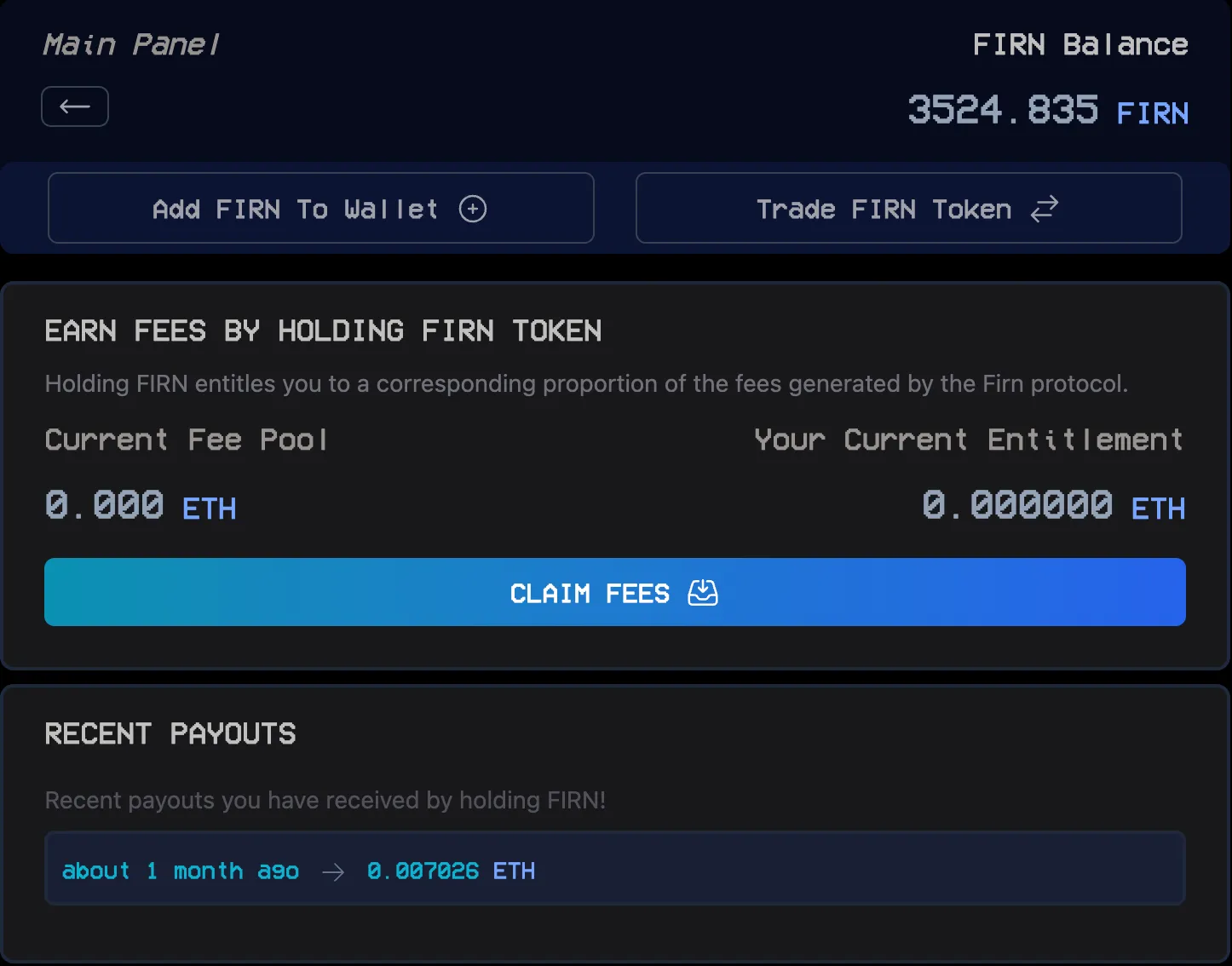
Firn’s UI exposes a panel dedicated to FIRN Token. To see this panel, first log in in the usual way; then, click the rightwards-facing arrow on the top right of the main panel, under the text *FIRN Token*. You should see something like this:

<figure><img src="https://3447577477-files.gitbook.io/~/files/v0/b/gitbook-x-prod.appspot.com/o/spaces%2F9gybBE9eYBHgZMTJRCk3%2Fuploads%2FHMsVypUF4CC2HVKwesSF%2Fclaim.webp?alt=media&amp;token=d69d894c-1fef-413f-8f4e-054432284633" alt=""><figcaption><p>You may <em>optionally</em> kick off a flush of Firn's fee pool, through the UI.</p></figcaption></figure>

If you want, you can, at any time, click the *Claim Fees* button, to initiate a global flush of the fee pool. Alternatively, you can also do this through Etherscan [directly](https://etherscan.io/address/0x9f70e166f2d2b7079df0e133bdecd104c143013b#writeContract#F2), by calling the *Payout* method on the pool contract.

Importantly, when you receive payouts, the relevant denominator is not the *total* supply of FIRN — which is fixed at 1,000,000 — but the *circulating* supply, which I will now explain. Certain caches of FIRN are exempted from receiving fees. This includes the FIRN held within the [Uniswap V3 pool](https://etherscan.io/address/0xd60a968159f04d9edbb34deaedded0402193b136), as well as the [firn.eth multisig](https://etherscan.io/address/0xa14664a2e58e804669e9ff1dfbc1bd981e13b0dc), which holds a large, inactive cache of FIRN. After subtracting these two accounts, we see that the circulating supply is around 76,762 FIRN units.

For example, let’s say someone withdraws 100 ETH from Firn Protocol. They will pay a fee of 0.79 ETH on that withdrawal. That 0.79 ETH will instantly flow into the fee pool contract (where it will add to whatever balance is already present in that contract, if any). Let’s say you own 1% of the circulating supply (so, specifically, 768 FIRN). When the flush happens, you will be directly paid 1% of the fee pool’s ETH balance (at the time of the flush). In our example, you will earn 0.0079 ETH from that withdrawal.


# Firn's MetaMask Snap

Firn's Snap makes integration easy.

One of Firn's key features is that its privacy is *pluggable*: you can call arbitrary smart contracts privately.

One difficult aspect, though, comes from the problem of assembling calldata. In *normal* (non-private) blockchain interactions, sophisticated front-ends like Uniswap's (or Firn's!) do the job of assembling transaction arguments for you, and also guide you through the process of submitting these to the blockchain.

In the setting where we want to do a complex contract interaction *and* get privacy at the same time, we'd like to still be able to leverage front-ends in order to populate our transactions, as we usually do. On the other hand, using Firn directly for this task—see the [God Mode](/overview/using-firn/god-mode) page—has the clear drawback that you have to enter your transaction arguments (or raw calldata) manually, and can't use the target site's web-based interface.

Firn's [*MetaMask Snap*](https://metamask.io/snaps/) offers a way of reconciling these two needs. Using our Snap, arbitrary third-party websites can integrate Firn's privacy functionality directly into their front-ends. Specifically, these applications can populate transaction arguments through a graphical interface, as they usually do, but then directly pipe these into Firn on the user's behalf. This can be viewed as a much-more-direct alternative to using God Mode.

Our Snap is fully working, and is ready for integration today. You can access it [through npm](https://www.npmjs.com/package/@firnprotocol/snap). For a live, hosted example app which *uses* our Snap, check out [tome.fm](https://tome.fm). Tome is, in fact, [open-source](https://github.com/firnprotocol/tome); by inspecting it, anyone interested in integrating Firn's pluggable privacy into *his own* project will find an invaluable template.